
Thermometer
Thermometer
Thermometer
Thermometer
Thermometer
Thermometer
Thermometer
Thermometer
Based on Reviews

Thermometer

Sick Day Essential

For All Ages

Battery Powered

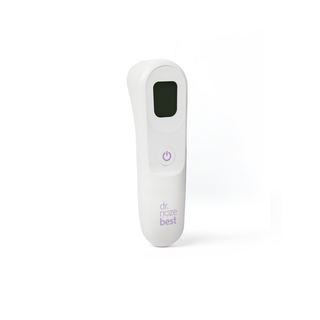
Thermometer uses patented infrared technology to ensure proper alignment for an accurate, touch-free reading in just one second.

Regular price $39.99
Regular price Sale price $39.99
Sold out

FREE U.S. SHIPPING ON ORDERS $100+

FREE 30-DAY RETURNS

Product Details

Accurate readings, right when you need them.

Patented Sensor That Only Reads When It’s Aligned
Most forehead thermometers lose accuracy when held at the wrong distance or angle. Ours uses patented infrared technology that takes a reading only when the sensor is correctly positioned - so the number you see is a number you can trust.


1-Second Touch-Free Reading
Point at the forehead from ~1 inch away, press once, and get a result in a second. No contact, no wrestling.


Silent Sleep Mode for Nighttime Checks
Switch off every beep and check a fever at 2am without waking your baby.


Large Backlit Display with Fever Indicator and 10-Reading Memory
Easy to read in a dark room, with fever indicators that tell you what the number means and 10 stored readings so you can see how a fever is trending before you call the doctor.


HSA/FSA Eligible


The best baby gift!

Don't miss out on this registry essential. 


 In the box: 1 thermometer, and 2 AAA alkaline batteries. Device size is 5.11in x 1.75in x 2.06in.


Contact us at 1-866-4NOSNOT with any questions

Materials & Care

Materials:

  • Main Unit: ABS with a TPR (Thermoplastic Rubber) coating

Care Instructions:

  • Clean the measurement sensor before and after each use with a 75% alcohol wipe.
  • Wipe the thermometer body with a soft, dry cloth.
  • Do not use abrasive cleaners, solvents, or submerge the device in liquid.

    Instruction Manual:
    Click here to download >

Frequently Paired With

Loading recommendations...

View full details

Get a reliable temperature reading in just one second

Get an accurate temperature reading in just one second.
With an intuitive design and easy-to-read display, taking temperatures is quick and stress-free, whether you're checking a sleeping baby or a busy toddler.
With 10-reading memory, you can track your child's temperature over time and monitor how a fever is progressing, helping you make informed decisions about their care.

How to use your Thermometer

1

Step 1

Install the two AAA batteries and securely replace the battery cover.
2

Step 2

Turn on the thermometer and position the sensor about 1 inch from the center of your child's forehead.
3

Step 3

Press the Measure button and hold the thermometer steady until the reading is complete.
4

Step 4

Review the temperature reading on the display.

What Makes Dr. Noze Best Different?

1

Physician Founded

Founded by Pediatric ENT Dr. Steven Goudy, Dr. Noze Best is focused on modern parental care must-haves.
2

Hospital-Level Quality

Our products are BPA-free, durable, safety tested, and in the case of the NozeBot, ISO and TUV SUD-certified.
3

Easy to Use & Effective

Only the NozeBot works in seconds with hospital-grade suction to clear severe nasal congestion.

Frequently Asked Questions

Why is my thermometer giving an inaccurate or unexpected reading?

Several factors can affect the accuracy of a temperature measurement. Try the following: 

  • Make sure the thermometer is aimed at the center of the forehead. 
  • Hold the thermometer approximately 3 cm (1.2 inches) away from the forehead. 
  • Ensure the forehead is free of hair, sweat, oil, makeup, or other obstructions. 
  • Clean the probe lens according to the Cleaning and Disinfection instructions. (Page 9 of Instruction Manual)  
  • If you or the thermometer has recently been exposed to very hot or cold temperatures, allow both to adjust to room temperature for at least 30 minutes before taking a measurement. 
  • Verify that the thermometer is set to Human Body Mode and not Surface Temperature Mode
  • Ensure the person remains still during measurement 
  • Do not compare readings taken while asleep to those taken while awake 
  • Avoid measurements within 30 minutes of physical activity, bathing, or outdoor exposure.  

Why won't my thermometer turn on?

If the thermometer does not power on: 

  • Replace the batteries with new ones. 
  • Confirm the batteries are installed correctly and the polarity (+/-) matches the battery compartment markings. 
  • If the thermometer still does not turn on after replacing the batteries, contact Customer Service. 

Why is the low battery symbol displayed?

  • The low battery icon indicates that the batteries are nearly depleted. 
  • Replace the batteries as soon as practical. 
  • Cold temperatures can temporarily reduce battery performance. If the thermometer has been stored in a cold environment, allow it and the batteries to warm to room temperature before use. 

What type of batteries does the thermometer use?

What type of batteries does the thermometer use?

How do I change between Fahrenheit and Celsius?

With the device powered on, press and hold the Memory and Mode buttons together to switch between Fahrenheit and Celsius. A beep confirms the change. 

How do I change between Standard mode and Night mode?

  • Press the Mode button to toggle modes 
  • Night mode silences all beeps. Night mode displays a moon icon.  

Why does my thermometer turn off automatically?

  • The thermometer is designed to automatically power off after 60 seconds of inactivity to conserve battery life. 
  • Press the Power button to turn the thermometer back on. 
  • If the thermometer continues to shut off unexpectedly, replace the batteries. 
  • If the problem persists after replacing the batteries, contact Customer Service

How do I clean my thermometer?

  • Clean the measurement sensor before and after each use with a 75% alcohol wipe 
  • Wipe the thermometer body with a soft, dry cloth  
  • Do not use abrasive cleaners, solvents, or submerge the device in liquid.  

When should I contact Customer Service?

Contact Customer Service if: 

  • The thermometer does not power on after replacing the batteries. 
  • The thermometer continues to shut off unexpectedly after installing new batteries. 
  • You continue to receive inaccurate readings after following the troubleshooting steps above. 
  • The thermometer appears damaged or is not operating as expected. 

Error Code Meanings

What does the “HI” error code mean?

Cause: The temperature is above the measurable range (above 109.4°F / 43°C).

Solution: Operate the thermometer only within the specified temperature ranges. If necessary, clean the sensor tip. In the event of a repeated error message, contact your retailer or customer service.

What does the “Lo” error code mean?

Cause: The temperature is below the measurable range (below 93.2°F / 34°C).

Solution: Operate the thermometer only within the specified temperature ranges. If necessary, clean the sensor tip. In the event of a repeated error message, contact your retailer or customer service.

What does the “Err” error code mean?

Cause: The operating temperature is outside the specified range (59°F~104°F / 15°C~40°C).

Solution: Operate the thermometer only within the specified operating temperature range.